Device Details
Overview
| Name | Version: | Liveset Setlist Manager 1.0 |
| Author: | juangenta |
| Device Type: | MIDI Effect |
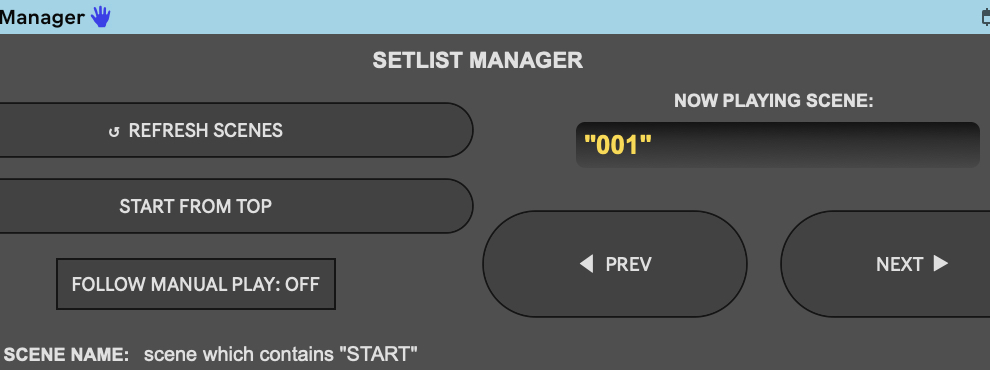
| Description: | WHAT DOES THIS DEVICE DO? Setlist Manager is a Max for Live device designed for live performances. It lets you navigate your Live set scene by scene — forward and backward — using physical buttons mapped on your MIDI controller, without touching the mouse or computer. Unlike Ableton’s native shortcuts, Setlist Manager does not depend on the visual focus of Session View. It maintains its own internal scene index and launches scenes directly by row number, making it robust against accidental clicks or view changes. Example workflow: • Load the device and press REFRESH SCENES: it loads all scenes from the Live set. • Press START FROM TOP: the device jumps to the starting scene and launches it. • From there, NEXT advances to the following scene and launches it. PREV goes back. • If at any point you manually launch a scene in Ableton, enabling FOLLOW MANUAL PLAY makes the device automatically sync its index, so the next NEXT command continues from that scene. THE PROBLEM IT SOLVES In a Live set with many scenes, navigating with the mouse during a performance is risky. Ableton’s native shortcuts (“Launch Next Scene”, “Launch Previous Scene”) depend on visual focus: if you click on a clip, a track, or any other UI element, the focus shifts and the shortcut may launch the wrong scene. Setlist Manager eliminates that dependency. It internally tracks which scene is “current” and navigates from that index, regardless of what has focus in Ableton. A second common issue in complex Live sets: scenes with empty rows at the top, often dedicated to loops that always run. The actual starting scene may be on row 10 or beyond. Setlist Manager solves this with START SCENE NAME: you search by name, not by position. THE INTERFACE The device is organized into two columns. The left column contains the active scene indicator (NOW PLAYING) and the reload button. The right column contains the navigation and follow controls. Element — Function REFRESH SCENES Loads all scenes from the Live set. It must be pressed at startup and every time scenes are added or renamed. NOW PLAYING Displays the name of the scene currently active in the device’s internal index. START FROM TOP Launches the starting scene (the one containing the string defined in START SCENE NAME) and positions the index there. < PREV Moves back one scene in the internal index and launches it in Ableton. NEXT > Advances one scene in the internal index and launches it in Ableton. FOLLOW MANUAL PLAY ON/OFF toggle. When enabled, manual scene launches from Ableton automatically synchronize the device’s internal index. See dedicated section below. START SCENE NAME Displays the string that identifies the starting scene. Configurable by editing the .js file. FOLLOW MANUAL PLAY During a performance, it’s common to deviate from the planned order: you might manually jump back to a previous scene, repeat a section, or improvise an unexpected transition. Without Follow enabled, the device is unaware of those changes, and the next NEXT command advances from where it thinks it is — not from where you actually are. Concrete example: • The device has launched scenes 1, 2, 3, 4, 5 in sequence. Its internal index is at 5. • During the performance, you decide to manually jump back to Scene 2 by clicking its launch button in Ableton. • With Follow disabled: the device does not detect the change. Its index remains at 5. The next NEXT will launch Scene 6 — which is not what you want. • With Follow enabled: the moment you manually launch Scene 2, the device synchronizes its index to 2. The next NEXT will launch Scene 3. |
Details
| Live Version Used: | 12.3.0 |
| Max Version Used: | 8.6.2 |
| Date Added: | Mar 01 2026 19:50:08 |
| Date Last Updated: | No Updates |
| Downloads: | 16 |
| ⓘ License: | None |
Average Rating
Log in to rate this device |
-n/a- |
Files
| Device File: | SetlistManager.amxd |
Login to comment on this device.
Browse the full library